
PDF files usually contain hidden metadata that most peoples never see but anyone can access.
This metadata may include your name, company, device details, software used, and creation dates. If you share PDFs with clients, teams, or online platforms, removing metadata is important for privacy, professionalism, and compliance. In this guide, you’ll learn how to delete metadata from PDF files safely, including on Mac, and why using a secure online tool is often the best option.
What Is Metadata in a PDF?
Metadata is hidden information stored inside a PDF file.
It doesn’t affect visible content but reveals technical and personal details to everyone.
Common PDF metadata includes:
- Author name
- Organization
- Software used (Word, Acrobat, etc.)
- Creation & modification dates
- File history
Anyone can view this via PDF Properties.
Types of Metadata Stored in PDF Files
PDF metadata usually falls into these categories:
- Descriptive metadata – title, author, subject
- Technical metadata – software name, PDF version
- Administrative metadata – creation and edit history
- Custom metadata – added by workflows or automation tools
Deleting metadata from a PDF file helps none of this hidden data travels with your document.
Why You Should Delete Metadata from PDF Files
Professionals remove metadata to:
- Protect personal & company identity
- Share clean, neutral documents
- Meet compliance & privacy standards
- Maintain professional credibility
If metadata is left unchanged, it can expose sensitive information by mistake
How to Check Metadata in a PDF File
Before you delete metadata from a PDF, it’s helpful to know what information is already stored inside the file.
Here’s how professionals usually check PDF metadata:
On Windows:
- Right-click the PDF file
- Select Properties
- Open the Details tab
You may see author name, application, and creation date.
On Mac:
- Open the PDF in Preview
- Click Tools → Show Inspector
- Go to the Info tab
This shows basic metadata, but not all hidden data.
Important:
Some metadata is not visible through default viewers, which is why complete metadata removal tools are recommended.
What Metadata Looks Like (Before vs After)
|
Metadata Field |
Before Removal |
|
Author |
Rahul S. |
Removed |
Software |
|
Removed |
Created Date |
12-03-2024 |
Removed |
Modified By |
Company Laptop |
Removed |
|---|
Content remains unchanged Hidden data is removed
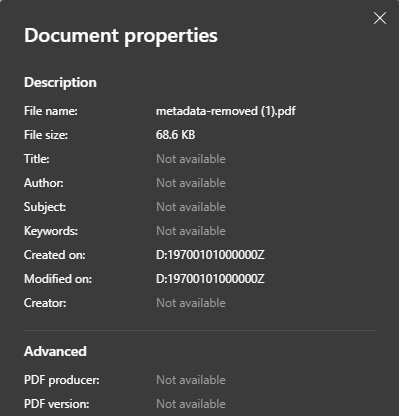
Here is an example of metadata removed pdf image document properties
How to Delete Metadata from PDF Online (Free)
The easiest way is using a secure online PDF metadata remover.
Step-by-step:
- Open the PDF Metadata Remover tool
- Select your PDF file
- Click Remove Metadata
- Download the cleaned PDF
Takes seconds
No visible content changes
How to Delete Metadata from PDF on Mac
Mac users often rely on Preview or paid software, but these methods are limited.
Options on macOS:
- Preview → Limited metadata removal
- Adobe Acrobat → Paid and complex
- Online tool → Fast and complete
Online tools work well on Mac, Windows, and mobile without installation.
Interactive Checklist – Does Your PDF Contain Metadata?
- Author name
- Editing software
- Creation date
- Company information
- File history
If you checked any, delete metadata from the PDF file before sharing.
Who Should Remove PDF Metadata?
- Professionals – client confidentiality
- Businesses – compliance and branding
- Students – personal privacy
- Journalists – source protection
- Legal & HR teams – document safety
Online Metadata Removal vs Desktop Software
|
Feature |
|
|
Installation |
|
Required |
Cost |
|
Often paid |
Ease of use |
Very easy |
Technical |
Cross-platform |
Yes |
OS-specific |
Privacy (client-side) |
Yes |
Depends |
|---|
For most professionals, online tools offer the best balance of speed, simplicity, and privacy.
Trust & Privacy – Is It Safe to Delete Metadata Online?
Yes if the tool works locally.
A secure metadata remover should:
- Not store files
- Not upload to servers
- Not track users
- Process inside your browser
Privacy-first tools are safe for professional use.
Did You Know?
- PDFs can store location data
- Metadata can reveal company devices
- Even scanned PDFs may include metadata
- Metadata removal can break digital signatures
Best Practices Before Sharing a PDF
Before sending a PDF externally, follow this tips:
- Review visible content
- Delete metadata from the PDF
- Compress the file if needed
- Rename the file professionally
- Avoid personal information in filenames
These steps help you share documents confidently and professionally.
Conclusion
Knowing how to delete metadata from PDF files is essential for professionals who value privacy, security, and credibility.
Whether you’re on Mac or Windows, using a free, secure online tool is the fastest and safest way to remove hidden data.
Before sharing your next document, clean the metadata first.
Why Trust Us
- Privacy-first philosophy
- Lightweight, browser-based tools
- Clear educational content
- Built for professionals & businesses
- Trusted by global users
FAQ Section
Does deleting metadata change PDF content?
No. Only hidden data is removed.
Can deleted metadata be recovered?
No, if properly removed.
Is metadata present in scanned PDFs?
Usually minimal, but file info still exists.
Does removing metadata reduce file size?
Sometimes slightly, but not significantly.
Is it safe to delete metadata from PDF online?
Yes, especially when using client-side tools that delete metadata from PDF files without uploading them
Will metadata removal affect digital signatures?
Yes, signatures may break.


